How to Build an Internal Linking Strategy
This guide explains what internal links are, why they matter for SEO, and provides a 5-step strategy to build an effective internal linking structure, from auditing existing links to measuring success, to boost site navigation, user engagement, and search rankings.
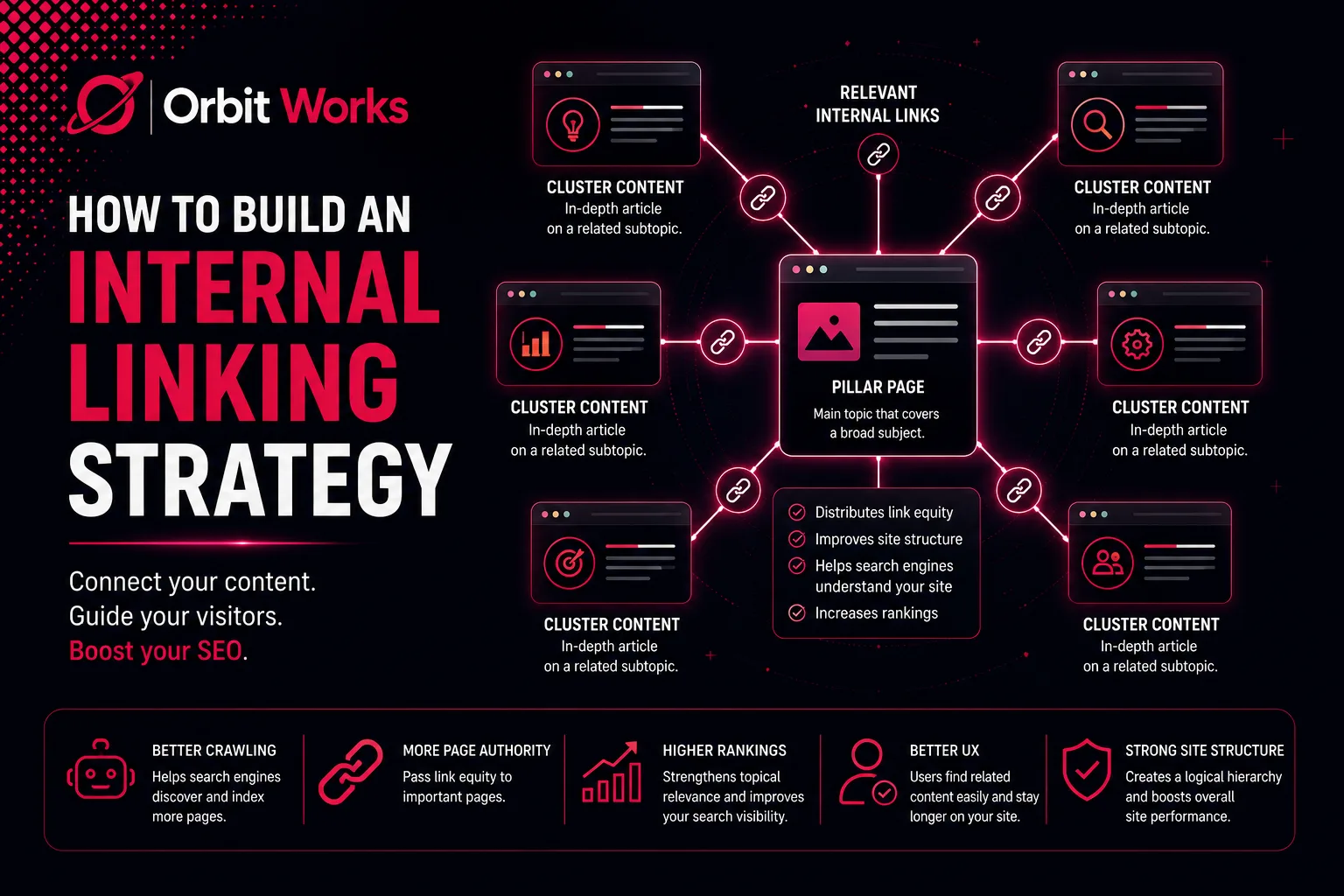
Internal linking might not seem exciting at first glance, yet it forms the essential skeleton that holds your website together. Imagine your website as a lively, sprawling city. In that context, internal links are the streets and highways connecting every vital destination. Without these connections, visitors and search engines can get stuck in dead ends, unable to navigate efficiently. Fortunately, building a smart internal linking strategy is simpler than it appears. This guide will show you how to create a linking structure that both search engines and visitors will appreciate.
What Are Internal Links?
A Simple Explanation of Link Types
Internal links are simply hyperlinks pointing from one page to another within the same domain. They act as navigational pathways, helping users and crawlers explore your website effortlessly.
Here’s an example of how an internal link looks in HTML:
<a href="https://yourwebsite.com/blog-post">This is your anchor text</a>
However, not every internal link carries the same weight. Different types exist, each with its own purpose.
Navigation Links
Navigation links include main menu items, headers, and footers. They appear consistently across all pages and support fundamental navigation. While critical for usability, they generally carry less SEO power than contextual links. For example, many website footers contain boxed elements that act primarily as navigation aids.
Contextual Links
Contextual links are the most potent type of internal link. They appear naturally within the content itself, connecting related ideas and topics. Search engines value them highly because they provide meaningful context and highlight relationships between pages. Often, these links stand out with distinct colours, making them easily noticeable to readers.
Structural Links
Structural links appear in areas like “Related Posts,” sidebars, or product recommendation sections. They enhance navigation and user experience but are less influential for SEO compared to contextual links.
Utility Links
Utility links point to important pages such as privacy policies, terms of service, or contact forms. They are necessary for functionality and compliance, but provide minimal search engine optimization value.
The secret to an effective internal linking strategy lies in understanding how to use each type. All links contribute, but naturally embedded contextual links deliver the strongest SEO benefits.
Why Are Internal Links Important for SEO?
Internal links do more than connect pages; they guide users and search engines throughout your website. They help crawlers discover hidden pages, pass authority between pages, and clarify your site’s structure.
Descriptive anchor text is crucial. Linking related pages informs search engines about page topics while simultaneously improving the user experience. Visitors who find helpful links tend to explore more, spend more time on your site, and engage more deeply. These factors all contribute to better rankings.
Moreover, internal linking builds topical authority. By connecting content around specific subjects, you signal to Google that your site has comprehensive coverage of a topic, establishing expertise and credibility in your niche.
How to Build an Internal Linking Strategy in 5 Steps
1. Audit Your Current Internal Links
Before adding new links, evaluate your existing structure. Identify pages with few or no links and check if your critical content is easily accessible. Fix broken links that may harm SEO. Tools like Google Search Console simplify this process by providing detailed reports on page connections.
2. Create Your Content Hierarchy
Think of your content as a pyramid. At the base are pillar pages covering main topics comprehensively. The middle layer contains supporting subtopics that go deeper into specifics. At the top, detailed pages address case studies, examples, or FAQs.
For example, a coffee website could be structured like this:
Bottom (Pillar): “Complete Guide to Coffee Brewing”
Middle: “Pour Over Coffee Guide,” “French Press Tutorial”
Top: “Best Water Temperature for Pour Over Coffee,” “Common French Press Mistakes”
Detailed pages should link back to subtopics and pillars. Pillar pages should link outward to relevant guides. This structure improves navigation and strengthens SEO connections.
3. Follow Internal Linking Best Practices
Use natural, descriptive anchor text. Avoid generic phrases like “click here.” Include keywords naturally, without overstuffing.
Link to relevant content only. A coffee brewing article should link to a coffee bean storage guide, not an unrelated “About” page.
Ensure links are visible. Place them where readers notice naturally, and use distinct colours to aid navigation.
Monitor link quantity. Quality beats quantity. A 1,000-word article does not need 50 links; focus on meaningful connections.
Prioritize important pages. Highlight lead magnets, product pages, and comprehensive guides. Low-priority pages, like privacy policies, require fewer links.
4. Implement Your Internal Linking Strategy
Start with high-value pages. These pages already have authority to share. Look for natural opportunities while reviewing content: ask, “Does a link here clarify this concept?” Update old content regularly to add links to new articles.
Plan new content strategically. Consider which existing pages it will connect to and which future pages will link back. This approach ensures a cohesive and efficient linking structure.
5. Avoid Common Internal Linking Mistakes
Vary anchor text naturally; avoid repetition. Link to deeper content rather than just the homepage. Prevent dead ends by ensuring every page contains relevant links. Avoid overlinking in one paragraph, which can overwhelm readers and dilute SEO value. Always prioritize user experience: links should guide readers naturally to helpful content.
Measuring the Success of Your Internal Linking Strategy
Track key metrics to evaluate effectiveness. Average time on site increases when visitors click internal links. Monitor pages per session to see how many pages users explore. Bounce rates decline when users find relevant connections, and rankings improve for strategically linked pages. Tools like Rank Tracker help identify gains and losses in search performance. By avoiding common mistakes and continuously monitoring results, your internal linking strategy can boost both SEO and user engagement.
Next Steps: Putting Your Strategy into Action
Now it’s time to act. Begin with 5–10 important pages and review current internal links. Are they connecting to relevant content effectively? Identify quick SEO wins with tools like LowFruits for pages ranking in positions 11–14, they often just need a small boost. Create a monthly linking schedule. Even dedicating an hour per month can make a difference. Finally, track your results. Small, consistent improvements over time compound into significant gains.
Conclusion
Internal linking is a foundational SEO tactic that improves site navigation, user engagement, and search visibility. By auditing current links, creating a clear content hierarchy, following best practices, and avoiding common mistakes, you can develop a cohesive linking structure.
Consistently reviewing and updating links, prioritizing high-value pages, and connecting relevant content strengthens topical authority. Over time, this strategy ensures that both users and search engines navigate your site effortlessly, boosting rankings, engagement, and traffic. A well-executed internal linking plan drives measurable, lasting results for any website.
FAQs
How many internal links should a page have?
There’s no set number. Focus on quality over quantity. Each link should provide value and make sense in context.
Should I use exact match anchor text?
Use keywords, but mix in variations naturally. For example: “brewing methods,” “how to brew coffee,” or “coffee brewing techniques.”
Do footer links count for SEO?
Yes, but they are less valuable than contextual links within the main content.
Should I open internal links in new tabs?
Generally, no. Reserve new tabs for external links that take users away.
How often should I audit internal links?
Quarterly is sufficient for most sites. For sites publishing frequently, monthly audits are recommended.
What about linking to old content?
Yes, as long as it remains relevant and updated.