Content Optimization in SEO - Easy Beginner’s Guide
This beginner-friendly guide covers the complete content optimization process, from keyword research and matching search intent to improving readability, adding internal links, and tracking performance, to help you boost your SEO visibility and attract more organic traffic.
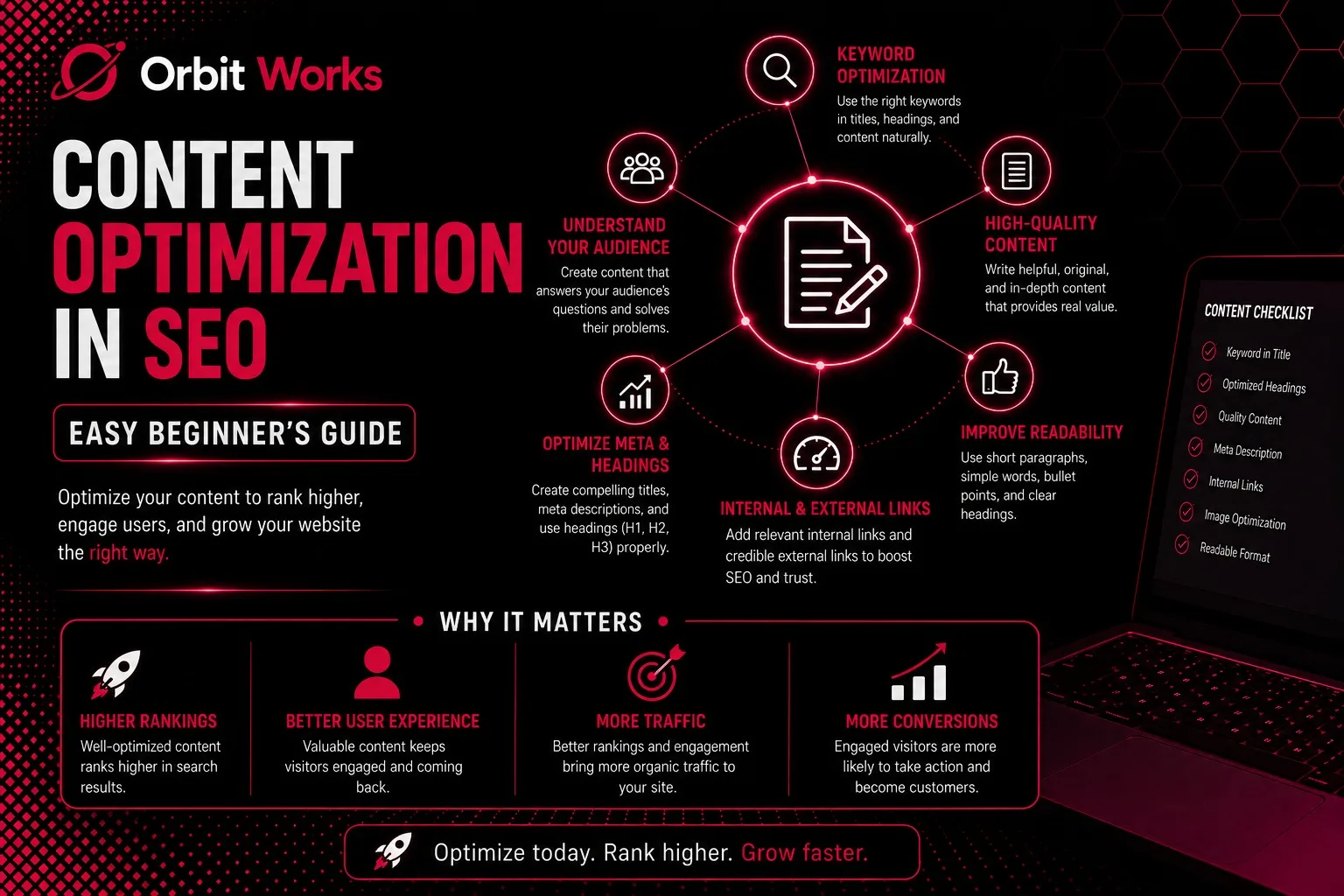
Want to increase the visibility of your content in search results?
Content optimization makes it possible.
In this beginner-friendly guide, you will discover how to optimize your content for search engine optimization, understand why it matters, and learn how to prepare your content for long-term success.
What Is Content Optimization?
Content optimization refers to improving the quality and structure of your website content. The goal is to make it more attractive for both search engines and readers. When content is properly optimized, it has a better chance of ranking higher in relevant search results.
Moreover, content optimization includes several important practices. For example, it involves aligning your content with search intent, adding relevant keywords according to keyword research trends, and improving readability. As a result, users can easily understand your content while search engines can properly index it.
Why Is SEO-Optimized Content Important?
SEO-optimized content plays a vital role in the success of any website. It helps your content reach the right audience and perform better in search engines.
- Increased Visibility: First of all, optimized content increases your online visibility. When your pages appear in search engine results, more people can discover your website. Consequently, this visibility brings more organic traffic from users actively searching for your topic.
- Improved User Experience: In addition, well-structured content improves the user experience. Readers can easily understand the information when the content is clear and engaging. Because of this, visitors tend to stay longer on your site.
- Higher Conversion Rates: Finally, better user engagement often leads to higher conversion rates. When users trust your content, they are more likely to take action, such as making a purchase or signing up for a service.
How to Optimize Content for SEO
Optimizing content for SEO requires a clear and strategic approach. By following the right steps, you can create content that performs well in search engines and delivers value to your audience.
1. Perform Keyword Research
Before you start writing content, keyword research should be your first step. It helps you understand what your target audience is searching for online.
Through keyword research, you can identify the words and phrases people type into search engines. These insights guide your content strategy and help you select the right keywords to target.
Furthermore, keyword research allows you to understand your audience’s needs. As a result, you can create content that answers their questions and solves their problems.
Several tools can help you conduct effective keyword research.
For instance, Semrush is another powerful tool designed for digital marketers and experienced SEO professionals. It offers extensive keyword data and analysis.
Similarly, SEOBoost works well for entrepreneurs and small businesses. It suggests relevant keywords while you optimize your content. Meanwhile,
Google Trends is a free tool that helps businesses identify trending keywords and search topics.
2. Identify Low-Competition Keywords
After selecting a keyword research tool, the next step is to identify keywords that are easier to rank for.
If you run a small business or a new website, focusing on low-competition keywords is a smart strategy. These keywords usually have fewer websites competing for them. Therefore, they provide better opportunities to achieve higher rankings.
Some tools, such as SEMrush and Google Keyword Planner, offer special metrics to evaluate keyword competition.
One important metric is SD (SERP Difficulty Score). This score measures how difficult it is to rank for a keyword. The scale ranges from 1 to 3, where 1 indicates the easiest keywords and 3 represents the most competitive ones.
Another useful indicator is Weak Spots. These refer to low-authority websites appearing in the top search results. When such competitors rank in the top 10, it means you may have a chance to outrank them with better content.
While selecting keywords, it is best to focus on terms with a low SD score, ideally around 1. In addition, look for keywords that show multiple weak spots in the results.
By analyzing these metrics, you can easily discover keywords that are simpler to rank for. Consequently, you can target these terms confidently and increase your chances of appearing higher in search results.
3. Determine Search Intent
Search intent explains why a user makes a search. It reflects the real purpose behind using a search engine. In simple words, it shows what the user actually wants to find.
Generally, search intent falls into four main categories.
Informational intent appears when users want to learn something or find answers.
Navigational intent occurs when users are trying to reach a particular website or page.
Commercial intent happens when people are researching products or services before making a decision.
Transactional intent means users are ready to take action, such as buying a product or signing up for a service.
Therefore, understanding search intent is essential for creating content that truly connects with your audience. When your content matches user intent, it becomes more relevant and useful.
But the question is, how can you identify the search intent of a keyword?
The answer lies in the SERP (Search Engine Results Page). Start by reviewing the pages that are currently ranking for that keyword. Notice the type of content that appears. For example, check whether the results include blog articles, eCommerce pages, landing pages, or user-generated content.
By examining the pages that already rank for the keyword, you can understand what search engines consider valuable. At the same time, you will see what kind of content users prefer.
Once you perform the search, you will see the top results for that keyword. Begin by reading the SEO titles. Often, titles reveal a lot about the page’s intent and structure.
However, it is also important to open the pages and review them closely. Click the links and analyze how each page explains the topic. Look at the structure, format, and information depth.
These observations help you shape your own content cluser strategy. As a result, you can create content that aligns better with user intent and search engine expectations.
4. Target Your Focus Keyword
At this stage, your keyword research is complete. You already know which keywords you want your content to rank for.
Now the next step is to apply on-page SEO best practices. Proper keyword placement helps search engines clearly understand the main topic of your page.
Your focus keyword should appear in several important areas of your content. These areas include the SEO title, meta description, H1 heading, and subheadings. It should also be included in the URL slug, introduction, body content, and conclusion.
When you place the focus keyword strategically in these sections, search engines can easily recognize what your page is about. Consequently, this increases the chances of ranking for relevant search queries.
To simplify this process, many marketers use content optimization tools. These tools ensure that you never miss placing your keyword in important sections.
For instance, SEOBoost is a popular optimization platform. It provides a content editor that feels similar to tools like Google Docs or Microsoft Word. Once you set your focus keyword, the platform gives real-time feedback on your optimization.
SEOBoost mainly evaluates keyword usage and content relevance. Meanwhile, other tools provide additional SEO insights.
One example is All in One SEO (AIOSEO), a powerful WordPress plugin. It helps analyze your keyword placement and overall SEO performance.
After you add your focus keyword to your WordPress post, the TruSEO analyzer scans the content. It highlights whether the keyword appears in critical sections or if any placement is missing.
Furthermore, these tools help you discover related keyword clusters. These clusters contain additional keywords connected to your main topic.
You can use these related keywords in the same piece of content to expand its reach. This approach helps your content appear for multiple relevant searches.
In addition, tools like SEOBoost also suggest related phrases. These recommendations usually appear in a sidebar, guiding you while you write.
Overall, such tools simplify keyword research and content optimization. They help you build stronger and more effective SEO content.
6. Provide Comprehensive Topic Coverage
When optimizing content for SEO, depth matters. Your content should cover the topic thoroughly rather than providing only surface-level information.
Therefore, it is important to explore the subject from multiple angles. A well-structured article should answer different questions related to the main topic.
Related subtopics: Start by discussing related subtopics. A broader approach helps your content address more search queries. As a result, readers gain deeper insights and find your content more valuable.
Multimedia elements: Next, include multimedia elements in your content. Images, infographics, and videos can improve the overall reading experience. These elements break long text sections and make information easier to understand. Moreover, visual content appeals to different types of learners.
You should also add real-world examples or case studies. Practical stories help explain complex ideas in a clear way. They make your content more relatable and easier to trust.
In addition, consider addressing frequently asked questions. Think about the common doubts or concerns users might have about the topic. When you answer these questions within your content, you provide extra value to your audience.
Ultimately, comprehensive content builds authority and trust. It shows readers that you understand the topic deeply. At the same time, search engines recognize your content as a reliable source of information.
7. Check the Readability
Readability shows how easy it is for people to read and understand your content. It reflects the clarity and simplicity of your writing. Therefore, good readability helps users quickly grasp your message.
Content should always be simple and clear. This allows readers from different backgrounds to understand it without confusion. When content is easy to read, users stay longer on the page.
So, how can you evaluate readability? The answer lies in using reliable SEO tools. Many modern SEO tools provide built-in readability analysis.
For example, tools like AIOSEO include a readability feature. It offers a detailed Readability Checklist. This checklist highlights areas that need improvement. As a result, you can adjust your content and improve its readability score.
8. Add Relevant Internal Links
Internal linking refers to connecting one page of your website to another related page. It plays an important role in improving website structure.
First of all, internal links make website navigation easier. They guide visitors to useful pages within your site. As a result, users can explore more information without leaving the website.
In addition, internal linking helps distribute link equity across your pages. This improves the overall SEO strength of your website.
However, anchor text should always be clear and descriptive. Anchor text is the visible text used in a hyperlink. It tells both users and search engines what the linked page is about.
For example, instead of writing “Click here,” use meaningful text such as “Learn more about SEO best practices.” This approach provides better context for both readers and search engines.
Consequently, descriptive anchor text can help your pages rank better for specific keywords.
Moreover, WordPress users have an additional advantage. Tools like AIOSEO offer a built-in feature called Link Assistant. It works directly inside the WordPress editor. This tool suggests relevant internal links and appropriate anchor text. Therefore, it simplifies the internal linking process.
Content Optimization Tips
Optimizing content does not end after publishing. Instead, continuous monitoring is essential for long-term SEO success.
Track Keywords & SEO Performance
Once your SEO-optimized content is live, tracking its performance becomes crucial. Monitoring helps you understand how well your content performs in search results.
Rank tracking tools allow you to monitor keyword positions. They show how your keywords move in search rankings over time.
For instance, you can quickly see which keywords improved. At the same time, you can identify those that dropped or remained unchanged.
Furthermore, most tracking tools allow deeper analysis. You can open each keyword to view its ranking history. This helps you understand performance trends.
Additionally, you can examine the top 10 ranking domains for that keyword. This insight helps you evaluate your competition and adjust your strategy accordingly.
Therefore, consistent keyword tracking ensures your SEO efforts remain effective.
Final Thoughts
Content optimization is an ongoing process. It requires attention to both readability and SEO structure. When your content is easy to read, users engage more and stay longer on your website.
At the same time, internal linking strengthens site navigation and distributes authority across pages. Additionally, monitoring keyword performance helps you understand what works and what needs improvement.
By combining clear writing, strategic internal links, and regular SEO tracking, you can steadily improve your content’s visibility in search engines. Ultimately, these practices help attract more organic traffic and create a stronger digital presence for your website.
FAQs
How do you optimize content for SEO?
Start with keyword research and target low-competition keywords. Use on-page SEO, images, and internal links, and track performance regularly.
Why is content optimization important?
It helps your content rank higher, attract the right audience, increase organic traffic, and improve user experience.
What are the best content optimization tools?
Top tools include SEOBoost, Grammarly, Clearscope, and for WordPress, All in One SEO plugin.