Is Bounce Rate a Ranking Factor?
Is bounce rate a ranking factor? Google says no, but it still tells a story about user engagement. Learn what bounce rate is, how to measure it, and practical ways to keep visitors on your site longer.
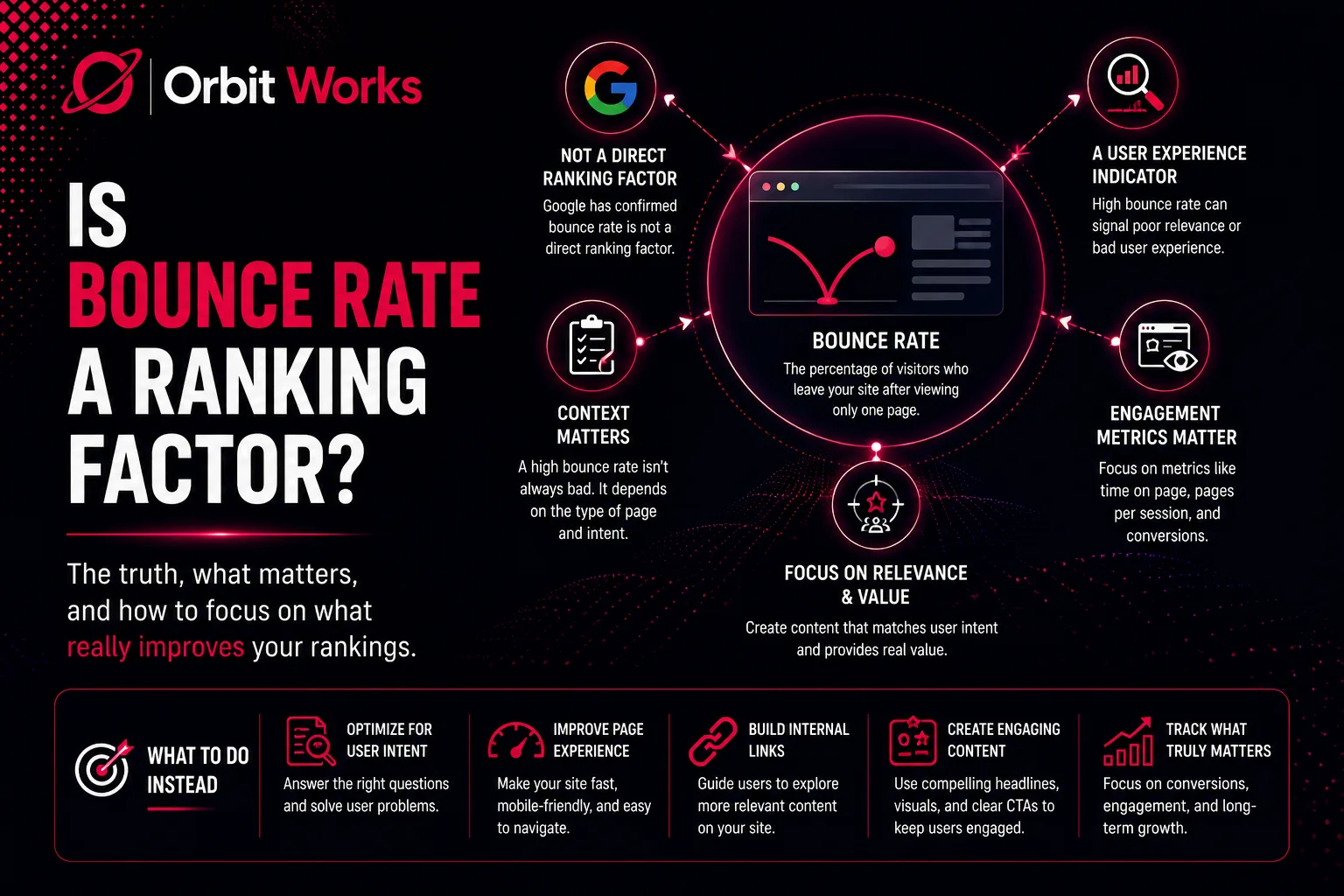
If you've ever explored SEO metrics, you've likely come across the term bounce rate. It's one of those numbers that makes marketers pause and wonder: Does it affect Google rankings? The simple answer is no, bounce rate is not a direct ranking factor. However, before you dismiss it entirely, consider this: bounce rate still tells a story about how visitors interact with your website, how engaging your content is, and whether your pages meet user expectations. Ignoring it could mean missing key opportunities to improve user experience and conversion rates.
Understanding How Do Search Engines Actually Work helps put bounce rate into proper perspective. Search engines evaluate hundreds of signals, and while bounce rate itself isn't one of them, the user behavior it reflects can indirectly influence your rankings.
In this guide, we'll walk you through everything you need to know about bounce rate. You'll learn what it is, how to measure it, why it matters, and practical ways to reduce it so your site keeps visitors engaged longer.
What Is Bounce Rate?
Bounce rate is a metric that measures the percentage of visitors who leave a website after viewing only one page. In other words, it tracks single-page sessions where no additional interactions occur. A high bounce rate indicates that visitors aren't exploring your website beyond the page they land on.
Google Analytics defines a bounce as:
- A session where the user only views one page
- Lasts less than 10 seconds
- Has no interactions such as clicks, signups, or conversions
It's important to note that not all bounces are negative. For example, users may visit a blog post to read a specific answer and then leave satisfied. In such cases, a bounce is just a natural reflection of how users consume content.
With Google Analytics 4 (GA4), engagement metrics have become more central. GA4 emphasizes user engagement over traditional bounce rate, treating a bounce as the opposite of engagement. This shift makes it easier for website owners to focus on meaningful interactions rather than raw exit statistics. The rise of AI in digital marketing has also made it possible to analyze user behavior patterns more deeply, helping you understand why visitors bounce and how to prevent it.
Is Bounce Rate a Ranking Factor?
The short answer: no.
Although it seems logical that Google would use bounce rate as a ranking signal—after all, if visitors leave immediately, doesn't that imply low content quality?—Google has explicitly stated that bounce rate does not directly influence search rankings. Many SEO experts have debated its importance, but the consensus is clear: bounce rate is a user behavior metric, not a ranking factor.
That said, bounce rate can indirectly impact SEO. Pages with high bounce rates might indicate poor content relevance, slow loading times, or a confusing layout. Improving these factors can increase engagement, which in turn can improve metrics that do influence search performance, such as dwell time, click-through rate, and pages per session.
When you understand what is digital marketing, you realize that bounce rate is just one piece of a much larger puzzle. It's a diagnostic tool that helps you identify areas for improvement, not a scorecard that determines your success.
What Is a Good Bounce Rate?
There is no universal benchmark for a good bounce rate. It varies depending on your website type, industry, and page purpose.
- Below 40% – Excellent. Indicates high user engagement and relevant content.
- 40–60% – Average. Could require analysis of content or website usability.
- Above 60% – High. Suggests potential problems with site design, content quality, or relevance.
Context matters. For example, FAQ pages often have naturally high bounce rates because visitors find the answers they need quickly. Similarly, blog posts might have higher bounce rates than eCommerce homepages, where exploration and purchases are expected.
Ultimately, a good bounce rate aligns with your website's goals. Focus on what makes sense for your audience rather than chasing an arbitrary percentage.
What Is the Average Bounce Rate?
Recent studies in 2024 analyzed 1.3 billion websites and found the average bounce rate to be around 50.9%. While this provides a benchmark, it's essential to remember that averages vary by industry.
- Blogs and content-heavy websites often have bounce rates exceeding 60%.
- eCommerce stores and service websites usually aim for 30–50% to maximize conversions.
The key takeaway is that bounce rate should be interpreted in the context of your audience and objectives, not just compared to an overall average.
How to Calculate Bounce Rate
Understanding how bounce rate is calculated helps interpret its meaning. Most analytics tools provide the metric automatically, but here's the formula:
Bounce Rate = (Single-Page Visits ÷ Total Sessions) × 100
For example, if your site has 200 visitors and 100 leave after one page:
100 ÷ 200 × 100 = 50% bounce rate
Keep in mind that platforms like Google Analytics may add nuances such as session duration or interaction tracking. Therefore, bounce rate should always be analyzed alongside engagement metrics, page views, and conversions.
How to Find Bounce Rate in Google Analytics 4
GA4 has shifted away from traditional bounce rate, focusing more on engagement rate, which is essentially its inverse. Here's what you need to know:
- A bounce in GA4 is a single-page session under 10 seconds with no interactions.
- Bounce rate = 100% – engagement rate.
- GA4 does not show bounce rate by default; it must be added manually to reports.
Calculating Bounce Rate Using Engagement Rate
- Go to the Reports tab in GA4.
- Click Acquisition → Traffic Acquisition.
- Locate the Engagement Rate column for each traffic channel.
For instance, if Organic Search shows a 73.48% engagement rate:
100 – 73.48 = 26.52% bounce rate
Adding Bounce Rate to GA4 Reports
- Select Reports from the left menu.
- Navigate to the report you want to customize.
- Click Customize Report → Metrics (requires Editor/Admin access).
- Type "Bounce rate" and click Apply.
- Save the report.
This ensures you can monitor bounce rate alongside other performance metrics.
How to Reduce Bounce Rate
Reducing bounce rate is about creating content that resonates with your audience and encourages interaction. Tools like LowFruits help identify low-competition, high-value keywords that attract the right traffic. Similarly, KWFinder helps you identify easy ranking opportunities among competitors with low domain authority.
Staying on top of keyword research trends ensures you're targeting terms that genuinely match user intent. When visitors find exactly what they're looking for, they're far less likely to bounce immediately.
Once visitors arrive, the goal is to keep them engaged. Tools like SEOBoost enable topic research, content creation, and on-page SEO improvements, giving real-time feedback on keyword optimization. WordPress users can also use All in One SEO (AIOSEO) for actionable checklists that improve on-page performance and engagement.
Tracking your SEO performance is critical. Using LowFruits' Rank Tracker, you can automatically monitor keyword rankings and identify where your efforts are paying off. This ties directly into your internal linking strategy, which helps guide visitors to related content and keeps them exploring your site longer.
Additional Strategies to Reduce Bounce Rate
Beyond keyword optimization, focus on:
High-quality content: Address your audience's questions and needs. Content that genuinely helps people naturally encourages them to stay longer.
Page speed: Faster load times reduce frustration and encourage users to explore. A slow page is one of the quickest ways to drive visitors away.
Navigation: Simplify your menu and make internal linking strategy intuitive. When visitors can easily find related content, they're more likely to click through and explore.
Calls to action: Guide visitors to take actions such as signing up, reading more, or purchasing. Clear CTAs give people a reason to stay engaged.
Mobile optimization: Ensure a seamless experience on all devices. With more than half of all web traffic coming from mobile, this is non-negotiable.
These strategies enhance user experience and naturally reduce bounce rate. Organizing your content around a topic cluster model can also help. When you group related articles around a central pillar page, you create clear pathways for visitors to explore deeper into your site.
Understanding Bounce Rate in Context
Bounce rate should never be viewed in isolation. Consider other metrics like time on page, pages per session, conversion rate, and exit rate. A page with a high bounce rate but long session duration might indicate readers are fully consuming the content. On the other hand, a high bounce rate with a low session duration could signal disengagement.
Understanding context helps you make informed decisions about content updates, design changes, and SEO strategies that truly improve the user experience. The growing influence of AI in digital marketing has made it easier to analyze these patterns and identify exactly where visitors are dropping off.
Final Thoughts
Bounce rate may not directly influence Google rankings, but it's a valuable metric for understanding user behavior. High bounce rates often highlight areas of improvement in content, design, or traffic targeting.
By focusing on engaging content, optimizing user experience, and leveraging tools to track keyword and engagement performance, you can indirectly improve your SEO while keeping visitors on your site longer.
If managing all of these factors feels overwhelming, professional SEO services in usa can provide the expertise and resources you need. Experienced providers of digital marketing services in usa understand how to optimize every aspect of your online presence, from bounce rate reduction to comprehensive SEO strategies.
Analyzing and acting on bounce rate insights ensures your website provides value to visitors and meets your business objectives. Turn passive users into engaged visitors who explore your content and take meaningful actions.
Frequently Asked Questions (FAQs)
1. Can bounce rate affect SEO indirectly?
Yes. While it's not a direct ranking factor, a high bounce rate can indicate poor content or user experience, which may indirectly impact SEO through lower engagement metrics. Understanding How Do Search Engines Actually Work helps you see why user satisfaction matters for long-term rankings.
2. What is considered a high bounce rate?
A bounce rate above 60% is typically high, but context matters. Some pages, like FAQs or blogs, naturally have higher rates. The key is understanding what's normal for your specific industry and page type.
3. How does GA4 differ from Universal Analytics in measuring bounce rate?
GA4 focuses on engagement rate rather than bounce rate, using a more comprehensive approach to track user interactions and time on page. This shift reflects broader AI in digital marketing trends toward understanding user behavior more holistically.
4. Can a fast-loading page still have a high bounce rate?
Yes. Speed is just one factor. Content relevance, design, and user intent play significant roles in engagement. Your internal linking strategy also matters—if visitors can't easily find related content, they're more likely to leave.
5. Are all bounces bad?
No. Some bounces indicate users found exactly what they needed and left satisfied, especially on informational pages or blogs. That's why context and user intent matter more than the raw number.
6. How does a topic cluster strategy help reduce bounce rate?
A topic cluster approach groups related content around a central pillar page, making it easy for visitors to navigate from one piece of content to another. This naturally increases page views per session and reduces bounce rates.
7. What's the relationship between bounce rate and keyword research?
Effective keyword research trends help you attract visitors who are genuinely interested in your content. When your keywords match user intent, visitors are more likely to stay and engage. Mismatched keywords often lead to high bounce rates.
8. Should I hire professionals to help with bounce rate optimization?
If you're struggling to reduce bounce rate or improve overall SEO performance, working with SEO services in usa or digital marketing services in usa can provide targeted strategies and expert guidance tailored to your specific needs.